
高速平板掃描機
XT6060

- Full Detail
- Specifications
- Features List
- Applications / Use Cases
- Download Brochure
XT6060
Patented smart auto-scan function
XT6060 is equipped with Microtek’s patented Auto-Scan function, which enables the scanner to scan automatically when detecting materials placed on the top, enhancing the efficiency of continuous scanning process.
.jpg)
600 dpi optical resolution and CCD image sensor
XT6060’s 600 dpi optical resolution meets every requirement from users about the clearness toward design drawings. Plus, a CCD image sensor performs much better than what a CIS image sensor can do in depth of field, speed and color presentation.
.jpg)
The fastest A3 flatbed scanner in the world
At 200 dpi, XT6060 needs less than 3 seconds to scan a color picture in A3 size.
.jpg)
Newly improved ScanWizard DI software ( PC Only )
All-in-one control panel offers a host of features and image adjustment controls. Supporting the TWAIN driver, ScanWizard DI also features full document scanning tools and on-screen proofing. Its multi-scanning area and preview option allow you to obtain quick scans in the preview window.
►Save multiple images as a single file
This advanced feature allows users to save multiple scanned images as a single file, depending on the number of the scanned images that are defined for document archival.
►Auto-crop and auto-deskew
The auto-crop function automatically detects the size of the original image, crops the full scan frame to fit the image, and removes unwanted black borders. The auto-deskew function automatically corrects distorted images for proper alignment.
.jpg)
►Auto Document Rotation
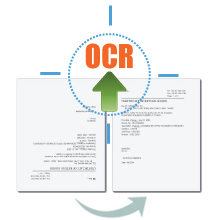
With this feature, the scanner automatically rotates every saved files in a readable direction based on a specific OCR language selected.
►Remove Punch Hole
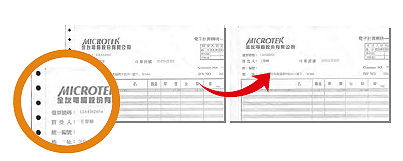
With this feature, the software automatically detects the location of punch holes on the scanned documents and fills them in white. This function works for most common hole puncher standards.
►Barcode Separator
This feature allows you to batch scan documents without starting and stopping each time a new file begins by using barcode numbers on the documents. It saves you huge amounts of time and money to organize, to index and to search files of documents in seconds, enhancing the efficiency and productivity of file management.
.jpg)
►Remove Blank Page
With this feature, blank pages are automatically detected and removed by the software when scanning a stack of documents. This function is quite helpful especially when users are scanning double-sided documents and some of the pages only have text on the front side.
.jpg)
►Smart Document Enhancement
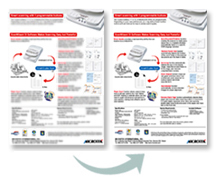
With this feature, the scanner automatically brings out and improves readability of text and removes unwanted background color (i.e., green, red, or blue) in/from a document that includes multi image elements.
.jpg)
►Paper count
The paper count allows user to keep track of all scan actions from both flatbed and ADF. This feature helps to estimate when you may need to replace the rubber or separation pad, or to apply maintenance and service to your scanner, making the use of your scanner more effectively.

►Document Enhancement
This feature brings out and improves the readability of text in a document that includes other elements such as color, pictures, or graphs.
Tailor-made Scanning Software for Mac System
ScanPotter scanning software, exclusively designed for Mac OS. More Details about ScanPotter
►OCR images into texts
The printed texts can be transferred into digital data easily and fast, saving a lot of time from entering texts manually and improving usages of images.
►Scan and Auto-crop Multiple Images
With this feature, the scanner is able to crop and extract multiple images in just one scan automatically, saving extra time from document scanning and image cropping.
►Auto-crop and auto-deskew
The auto-crop function automatically detects the size of the original image, crops the full scan frame to fit the image, and removes unwanted black borders. The auto-deskew function automatically corrects distorted images for proper alignment.
►Online Update
When detecting the latest version through the Internet, ScanPotter will automatically remind users to download the update.
Specifications
| Item | Details |
| Product Name | XT6060 |
| Scanner Type | Flatbed color document scanner |
| Image Sensor Type | CCD |
| Resolution | 600 dpi |
| Light Source | LED |
| Memory Size | 32MB SDRAM |
| Scanning Area | 12" x 17" (305 x 431.8 mm) |
| Scanning Speed | Color: 3 sec @ 200 dpi, A3 / 20 ppm; Gray: 3 sec @ 200 dpi, A3 / 20 ppm |
| Bit Depth | 8 bit / 24 bit |
| Paper Size | A3 |
| Connectivity | Hi-Speed USB (USB 2.0) |
| Drivers | TWAIN |
| Smart-Touch Buttons | One scan button (Auto document detect and scan) |
| Scanable Media Types | Reflective |
| Supported File Types | BMP、JPEG、PDF、TIFF、PDF/TIFF-Multiple Pages |
| Environmental Compliance | WEEE, RoHS, EuP |
| OS Support | Windows 7/8/10/11(ScanWizard DI) ; OS X 10.10 - macOS 10.14 (ScanPotter) ; macOS 10.15 or later (ScanPotter 2) |
| Dimensions (L x W x H) | 24.7" x 14.8" x 5.1" / 627.4 x 375.9 x 129.5 mm |
| Weight | 20.9 lbs (9.5 kg) |
| Certifications | CE, FCC, BSMI, CCC, C-Tick, VCCI |
| Power Source | DC 15V, 2.5A |
| Power Consumption | 38 Watts |
| System Requirements PC | CD-ROM drive (for installing software) Color display with 24-bit color output capability 512 MB RAM or more Pentium IV PC or higher with USB 2.0 port Microsoft Windows 7/8/10/11 |
| System Requirements for Mac | MacBook introduced in 2009 or later, plus MacBook (13-inch, Aluminum, Late 2008) MacBook Air introduced in late 2008 or later MacBook Pro introduced in mid 2007 or later Mac mini introduced in early 2009 or later iMac introduced in mid 2007 or later Mac Pro introduced in early 2008 or later |
| Software Included | Microtek ScanWizard DI Microtek ScanPotter(Mac) Microtek DocWizard Adobe Acrobat Reader |
| Accessories | Scanner unit Hi-Speed USB cable (USB 2.0) Power adaptor Software CD (s) User’s manual (s) |
*Product specifications described herein are subject to change without notice.
Features List
高速A3掃描效能:可在3秒內以200 dpi解析度掃描超大尺寸A3文件或圖形,為全彩和灰階工作負載提供快速的資料吞吐量。
專業CCD影像感測器:內建高靈敏度彩色線性CCD感測器,可提供真正的600 dpi光學解析度。與標準CIS感光元件相比,它具有更出色的景深、更豐富的色彩表現和更清晰的文字清晰度。
專利智慧自動掃描功能:配備智慧型內建紙張偵測感應器。當文件放置在掃描平台上時,掃描器會自動觸發掃描週期,無需重複的手動點擊操作,從而優化連續批次工作流程。
即時啟動,無需預熱的LED光源:採用節能LED系統,可在通電後立即提供穩定均勻的照明,消除延遲時間,並保護易損介質免受過熱影響。
進階文件處理引擎:捆綁了專業的 ScanWizard DI (PC) 和 ScanPotter (Mac) 套件,提供強大的自動化功能,如智慧型自動裁剪、自動傾斜、空白頁刪除、打孔刪除和多頁 PDF 編譯。
Applications / Use Cases
建築、工程及施工 (AEC):非常適合工程事務所快速數位化、歸檔和整理大型建築藍圖、機械 CAD 草圖和結構佈局圖。
藝術工作室及平面設計機構:非常適合掃描超大尺寸的實體圖形、大型彩色草圖、背景資料和雜誌版面,並能精確還原色彩和深度。
出版社及大眾傳播媒體數位化:專為媒體公司和出版公司量身定制,可高效掃描大型圖書登記冊、報紙和報紙大小的跨頁,且不會丟失邊緣數據。
企業及政府行政檔案:政府部門、律師事務所和行政中心使用該軟體,可將連續堆積的法律帳簿、財務活頁夾和多頁 A3 表格快速轉換為結構化的、可文字搜尋的數位檔案庫。

